A strong talking head video feels direct because the viewer believes you are speaking to them, not to a script on your desk. The hard part is that you still need structure. If your notes are below the lens, your eyes drop. If your notes are beside the camera, your gaze drifts. If you memorize everything, the delivery often becomes stiff.
The practical answer is not to stare harder. It is to design the recording setup so your script, lens, voice, and body language all work together. In this guide, you will learn how to record a talking head video while keeping natural eye contact with the camera, using a readable script, careful framing, teleprompter controls, and a short rehearsal routine.
Why your eyes drift away from the lens
Most gaze problems come from one of four places: the script is too far from the lens, the lines are too dense to read quickly, the scroll speed does not match your speaking pace, or the camera is not at eye level. When any of those pieces is wrong, the viewer sees the problem immediately. Your eyes flick down, pause, search, or move from side to side.
For a talking head video, the goal is not constant unbroken eye contact. Real speakers blink, pause, and think. The goal is to avoid repeated visible glances away from the audience. The viewer should feel that your attention is mostly on them, even while you are being guided by a script.
Set the camera at eye level before touching the script
Start with the physical setup. Put the camera lens at eye level or slightly above it. If the camera is too low, your face leans down and the viewer sees the top of your eyes. If it is too high, your head tilts up and your delivery can feel less relaxed. A small tripod, laptop stand, phone mount, or stack of books is enough for a test.
Use the front camera when you need to see framing and script placement on the same device. Use the back camera only when image quality matters more and you can verify framing with a test take. For creator videos, lessons, sales explainers, and internal updates, front-camera confidence often matters more than the last bit of sharpness.
Before recording the full video, capture ten seconds. Check whether your eyes naturally land near the lens, whether your head is centered, and whether the script area covers your face. This small test prevents the most common talking head mistake: spending all your energy on the words while the frame quietly works against you.
Place the script as close to the lens as possible
Eye contact breaks when the viewer can see the angle between your eyes and the text. On a phone, tablet, or laptop, keep the script close to the camera side of the screen. If you are recording on a phone, place the most important reading line near the top area around the lens. If you are using a laptop webcam, keep the teleprompter window narrow and high, not full width across the lower screen.
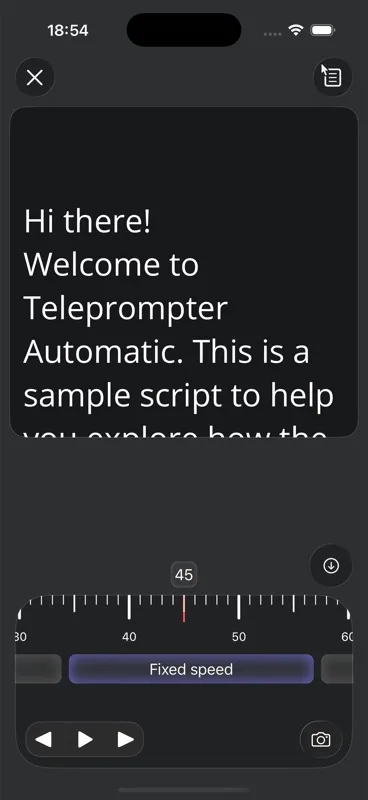
This is where a teleprompter app helps. Instead of putting notes on paper or a second monitor, you can keep the script in the same visual field as the camera. Teleprompter Automatic's reader controls let you test script speed and readability before you record, so the script can guide your delivery without pulling your eyes far away from the lens.
Write a talking head script that can be read naturally
The best camera setup cannot fix a script that was written like an essay. Talking head scripts need spoken rhythm. Write short sentences. Use one idea per paragraph. Keep transitions visible. Add small notes for pauses only where they help, such as "pause", "smile", or "show the example". Avoid long clauses that force you to scan ahead while speaking.
A useful structure for a talking head video is simple:
- Open with the viewer's problem in one or two sentences.
- Give the outcome they will get by the end of the video.
- Move through three to five clear points.
- Close with the next action, summary, or question.
For example, instead of writing "In today's video, I would like to spend some time discussing several strategies that may help creators improve their on-camera presence," write "Today I will show you how to keep eye contact while reading a script." The second version is easier to read, easier to deliver, and easier for the viewer to understand.
Choose a teleprompter mode that matches the take
Use fixed speed when you already know your pace and want predictable movement. Use timed scrolling when the script must finish at a specific duration. Use words-per-minute scrolling when you are practicing a speech or lesson around a target reading pace. Use Voice Scroll or speech recognition when you want the text to follow your spoken words and you expect pauses, emphasis, or small changes in rhythm.
For a high-stakes talking head video, fixed speed is often the safest first test because it is predictable. If you need to pause naturally, repeat a phrase, or leave space for emphasis, test Voice Scroll and speech recognition with one paragraph before committing to a full take. Speech-based scrolling works best when the script language, selected recognition language, and spoken delivery match closely.
Set scroll speed by reading aloud, not by guessing
Do not set speed by looking at the screen silently. Silent reading is faster than camera delivery. Open one paragraph, press play, and read it out loud in the tone you will use on camera. If you reach the end of each line too late, slow the scroll. If you finish early and wait for the next line, speed it up. Repeat for 15 to 30 seconds.
In Teleprompter Automatic, the teleprompter scrolling controls are the place to tune speed, text size, alignment, mirror behavior, countdown, and cue position. Increase font size when the device is farther away. Use a cue indicator if your eyes need one stable reading line. Keep line height comfortable so you do not lose your place during a blink or gesture.
Rehearse the first 20 seconds until it stops feeling read
The first 20 seconds carry the biggest trust burden. Viewers decide quickly whether you are talking to them or performing at them. Rehearse the opening three times before recording the full take. Each time, look at the lens before you start, let the first line appear, and speak as if you are explaining the idea to one person.
Try this quick rehearsal loop:
- Read the opening once with the teleprompter stopped.
- Read it once with scrolling on, but do not record.
- Record a short test and watch only your eyes.
- Adjust script position or speed before recording the full video.
If your eyes look tense, the script is probably too dense or the text is moving too fast. If your delivery sounds flat, mark a few natural pauses and shorten the sentences. The fix is usually smaller script chunks, not more effort.
Use tiny delivery habits that hide the reading
A teleprompter works best when it supports a real performance. Keep your head still enough that your eyes do not chase the text, but not so still that you look frozen. Blink normally. Let your eyebrows and hands react to the meaning of the sentence. Pause at the end of a thought instead of rushing into the next line.
When you need to look away, make it intentional. A brief glance down to pick up a prop, check a product, or transition to a screen recording feels natural. Repeated micro-glances to find your place feel like reading. The viewer can accept a thoughtful pause; they notice a searching gaze.
Run a recording preflight before the full take
Before the real recording, check the parts that affect both eye contact and production quality. Teleprompter Automatic's recording workflow starts from the script and reader, then moves into camera and microphone readiness. If you are unsure about the setup, use the camera and recording settings guide before a long take.
- Camera: lens at eye level, face centered, enough headroom.
- Script: reading line near the lens, text large enough, comfortable spacing.
- Speed: tested aloud, not silently.
- Audio: microphone selected and checked in a short recording.
- Lighting: face brighter than the background, no strong backlight.
- Countdown: enough time to look at the lens before speaking.
This preflight is especially useful when recording courses, expert commentary, product demos, investor updates, sermons, or sales videos. The more serious the message, the more a wandering gaze can weaken confidence.
Fix the most common eye-contact problems
If your eyes move left and right, the text block is too wide. Narrow the reading area or increase the font size so each line is easier to scan. If your eyes drop below the lens, move the script higher or raise the camera. If your eyes look rushed, slow the scroll and add shorter paragraphs. If your delivery sounds robotic, rewrite the script in spoken language and add pauses.
If you keep losing your place, do not simply make the text larger. Break the script into smaller sections. Record one section at a time if the video allows it. A clean edit between two confident sections is usually better than one long take where your eyes keep searching.
Record, review, and export only the take that feels direct
After recording, review the take once for eyes, once for sound, and once for message. Do not judge everything at the same time. On the first review, mute the audio and watch your gaze. If you repeatedly look away from the lens, fix the setup and record again. On the second review, listen for pacing and clarity. On the third review, check whether the message lands.
When the take works, continue with recording and export. Keep the workflow boring: save the take, trim obvious dead space, add subtitles or formatting when your platform needs them, and export the version that matches where the video will be published.
When you should not read a full script
Some talking head videos work better with bullet points. If the video is emotional, highly personal, or conversational, a full script can make you sound too controlled. In those cases, write a short outline and use the teleprompter for anchor phrases: the opening, the key points, the transition, and the closing call to action.
For tutorials, lessons, product explainers, business updates, and videos where wording matters, a fuller script is useful. For reactions, personal stories, and interviews, a lighter outline may keep the performance more alive. The premium version of the workflow is not "always read every word". It is choosing the right amount of structure for the video.
A simple talking head setup to copy
Use this setup when you want a reliable starting point:
- Phone or webcam at eye level.
- Teleprompter text close to the lens side of the screen.
- Short spoken paragraphs with one idea each.
- Fixed speed for predictable delivery, or Voice Scroll after a short test.
- Countdown enabled so you can look at the lens before speaking.
- One 10-second test recording before every important take.
Once this feels natural, you can adjust for style: wider framing for hand gestures, tighter framing for direct advice, or a slower scroll for serious topics. The foundation stays the same: put the script where your eyes already need to be, then make the words easy enough to say like a person.