A 30-second video ad has room for one promise, one proof point, and one next action. A teleprompter script keeps those pieces in order so the speaker does not spend half the spot warming up.
Use this workflow for short paid ads, creator promos, product explainers, course launches, local business offers, event reminders, and social clips where the final video needs to land quickly. Teleprompter Automatic helps after the script is ready: create or import the text, open it in the reader, test the scroll pace aloud, record a short take, then export the version that fits the channel.
Start with one job for the ad
Before writing a line, decide what the ad must do. A 30-second spot cannot introduce a brand, explain a whole product, answer every objection, and close a sale at the same time. Choose one primary action: visit a page, book a call, try the app, claim an offer, watch a full demo, or remember a launch date.
Write that action at the top of the script file. Then remove any sentence that does not make the action more obvious. This is where a teleprompter workflow is useful: the script is not only a memory aid, it is the filter that stops a short ad from becoming a mini presentation.
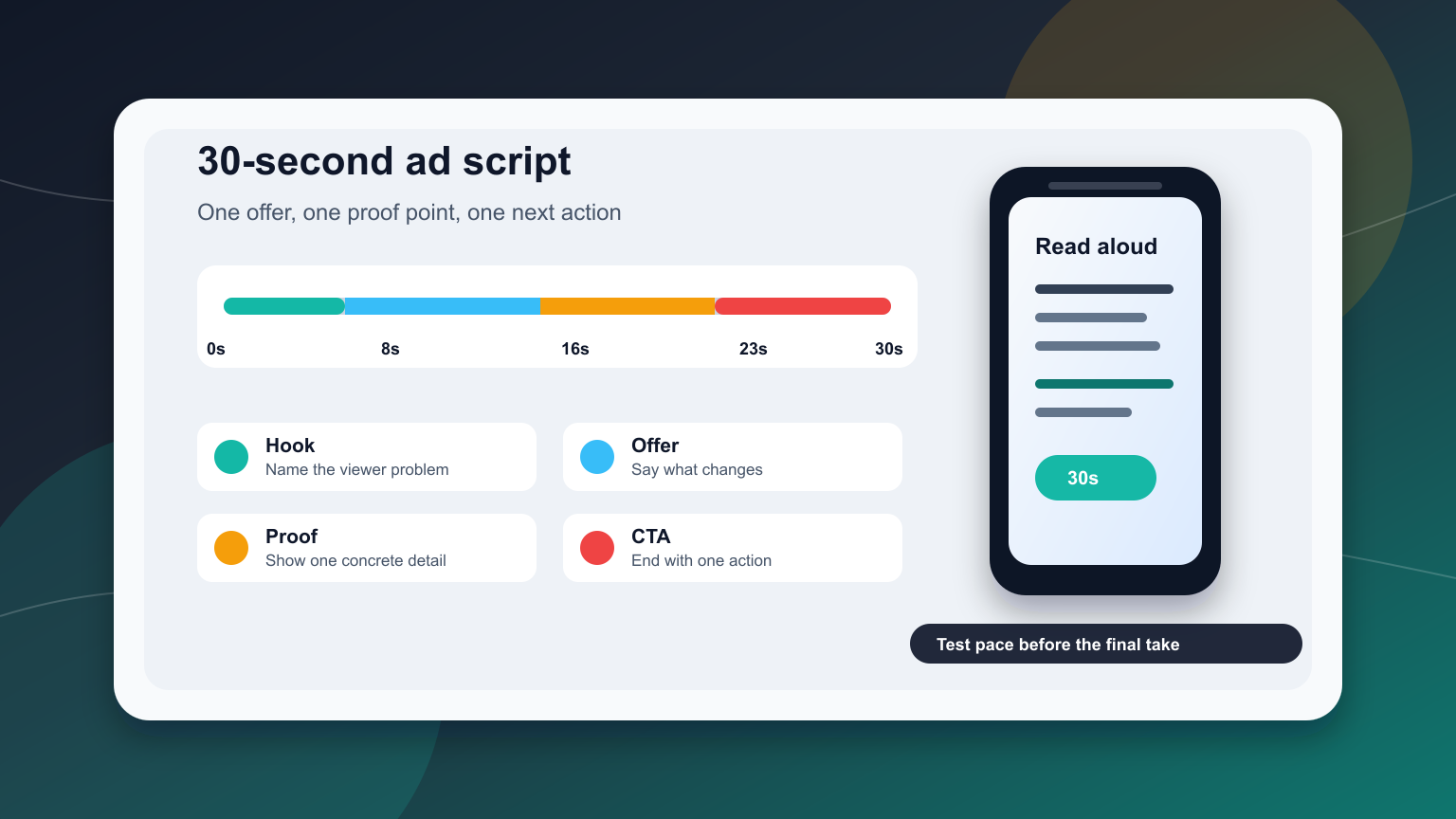
Use a 30-second timing map
Most 30-second ads work better when the timing is planned before the wording is polished. At a natural spoken pace, the script is usually around 70 to 85 words, depending on pauses, product shots, and how fast the speaker talks. If the offer needs legal, pricing, or eligibility language, leave more silence and use fewer selling words.
A simple timing map:
- 0 to 3 seconds: name the problem, desire, or situation.
- 3 to 8 seconds: show why the viewer should care now.
- 8 to 16 seconds: explain the offer in plain language.
- 16 to 23 seconds: add one proof point, demo moment, or concrete detail you can support.
- 23 to 30 seconds: give one call to action and stop talking.
That last part matters. Many short ads fail because the closing line arrives at second 29, leaving no time for the viewer to absorb it. Write the call to action early enough that it can be said calmly.
Draft the script in five spoken blocks
Write the ad as five small blocks instead of one paragraph. Each block should be easy to say without scanning ahead. If a line looks clever but feels awkward out loud, cut it or make it plainer.
Use this template as a first pass:
- Hook: “If you need [outcome] without [pain], this is for you.”
- Context: “Most people lose time because [specific problem].”
- Offer: “[Product or service] helps you [specific action].”
- Proof: “Use it for [concrete scenario], [example], or [viewer task].”
- CTA: “Start with [one next action].”
Keep the placeholders honest. Do not invent outcomes, ratings, scarcity, pricing, or guarantees just because the ad is short. A clear supported claim is stronger than a dramatic one the viewer cannot verify.
Format the teleprompter text for short-ad delivery
Teleprompter text should look different from a document. Put each spoken thought on its own line, keep the CTA isolated, and leave small visual breaks where the speaker should breathe or where the edit may cut to a product shot.
For a 30-second ad, avoid long wrapped sentences. They force the reader to move their eyes sideways while trying to stay connected to the camera. Short lines also make it easier to record several variations: one stronger hook, one softer hook, one CTA for paid traffic, and one CTA for organic social.
If you are preparing the script outside the phone, the create and import scripts guide covers the path from draft text into Teleprompter Automatic. Use plain text as the safest transfer format when exact formatting is not important.
Set reader speed by reading the ad aloud
Do not set scroll speed by silently reading the script. Silent reading hides timing problems. Open the first version in the reader, press play, and speak at camera pace. If you finish lines before they leave the screen, the ad may be too slow or too sparse. If lines disappear before you finish them, the script is too dense or the reader is moving too fast.
Teleprompter Automatic supports reader controls such as fixed-speed, timed, words-per-minute, and speech-recognition scrolling on supported platforms. For a 30-second ad, fixed or timed scrolling is often the cleanest first test because the target duration is strict. If you need natural pauses, test speech-based scrolling with the exact script language and microphone setup before relying on it for the final take.
For detailed reader setup, use the scrolling and reader controls guide. If the first draft feels too long, check the speech time calculator before recording more takes.
Plan what the camera sees during each block
A short ad is easier to record when each block has a visual job. The hook may be a direct face-to-camera line. The offer may show the product, app screen, store shelf, service result, or location. The proof block may show one specific action instead of a vague montage.
Add camera notes only when they help the speaker. For example:
- “look at lens” before the hook
- “show product” before the offer line
- “pause” before the CTA
- “smile, then stop” after the final word
Do not overload the teleprompter with production notes. If every line has three directions, the speaker will read the directions instead of the message. Keep the script clean and put detailed shot planning in a separate checklist.
Record three short test takes
Record one take for timing, one for eye line, and one for message clarity. The first take answers, “Does this fit 30 seconds?” The second answers, “Do my eyes stay near the camera?” The third answers, “Would a viewer understand what to do next?”
Teleprompter Automatic recording tools are useful here because the script, reader, camera check, review, and export workflow stay close together. Before the final take, confirm framing, microphone choice, orientation, and countdown in the camera and recording settings workflow.
Prepare channel-specific versions
The same 30-second script should not be pasted everywhere unchanged. A vertical social ad can start faster and use tighter language. A website hero video may need a calmer first line. A retargeting ad can assume the viewer already knows the category. A local business ad may need the neighborhood, date, or offer window closer to the beginning.
Save the master script, then create small variants with the same structure:
- Vertical social: shortest hook, earlier visual change, direct CTA.
- YouTube or pre-roll: clear category cue before the offer.
- Landing page: calmer proof point and CTA that matches the page button.
- Event or deadline: date and action near the start, not buried at the end.
When the take is ready, use the record and export videos guide to move from recording to the file format you need.
Common mistakes to avoid
- trying to explain the entire product in one 30-second ad
- starting with a long greeting instead of the viewer problem
- using unsupported claims, fake urgency, or vague “best” language
- hiding the CTA in the final two seconds
- setting scroll speed without reading aloud
- recording one long take instead of testing several short variations
Related Teleprompter Automatic guides
- record a clear sales video with a teleprompter - Expands the offer, proof, objection, and CTA workflow for longer sales videos.
- Teleprompter Automatic for content creators - Connects short ads to broader creator recording workflows.
- scrolling and reader controls - Tune pacing, readability, and scroll mode before the final take.
- speech time calculator - Estimate whether a script can fit the target duration.
- record and export videos - Save the finished ad for the channel where it will run.