This guide explains how to add text to Teleprompter Automatic and prepare it for reading. Use it when you need to create a script from scratch, organize scripts in folders, import a supported file, convert a PDF script into readable text, or adjust text before opening the reader.
Create a blank script
- Open Library.
- Select Add New.
- Choose Blank script.
- Enter a script name and paste or write your text.
- Save the script and open it for reading.
Keep paragraphs short. Teleprompter text is easier to read when each idea has its own line or short block.
Organize scripts with folders
Folders help when you record for different clients, channels, courses, or campaigns. Create one folder per project, then keep related scripts together so they are easier to find before a recording session.
Import supported files
In the web dashboard, import is intended for text-based files such as TXT, MD, RTF, SRT, and VTT. On Android, import supports TXT, DOC/DOCX, PPT/PPTX, XLS/XLSX, and PDF. If one platform does not show the same import option, export or copy the script as plain text and paste it into a blank script.
Import a script from PDF
- Open the script library and choose the import option.
- Choose the PDF import card when it is available on your device.
- Select a PDF that contains selectable text, not only scanned images.
- Wait for Teleprompter Automatic to extract the text and open the imported script in the editor.
- Review the script before reading: remove page numbers, headers, footers, hard line breaks, and any text that came from margins or slide notes.
PDF import is best for clean, text-based documents. If the PDF is scanned, image-only, password-protected, or laid out in several columns, extract the text with an OCR/document tool first or paste the final script manually. A cleaned TXT file is usually the safest fallback.
Adjust text before reading
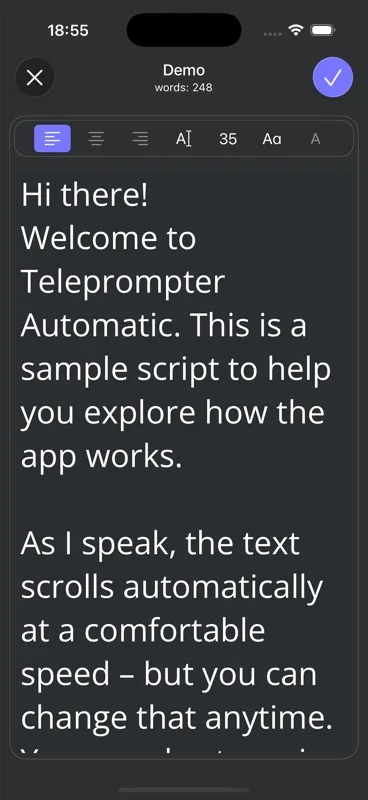
Use editor controls for text size, line height, alignment, and uppercase styling. These settings help readability, but the best test is still a short rehearsal in the reader.
Open the script for reading
When the script is ready, open it in the reader and adjust the scroll speed. The getting started guide explains the first reader test, and the recording guide covers what to do next.
Troubleshooting imports
- If the file is rejected, export it as TXT and import again.
- If a PDF imports as empty text, check whether it is a scanned image PDF and run OCR before importing.
- If the script looks too long, split it into sections.
- If subtitles import with timestamps, remove timestamps before recording unless you need them as speaking cues.
- If formatting looks wrong, paste the text into a blank script and apply reader settings again.
For sync behavior after creating scripts, read cloud sync and video storage.