Write with a full keyboard
Create, import, search, and organize scripts and folders from a desktop workspace.
Teleprompter Automatic on the Web
Use a full keyboard for scripts, open the browser reader, record from a webcam, manage cloud work, and control a mobile reader from another device.
Create, import, search, and organize scripts and folders from a desktop workspace.
Open reader mode or capture from a supported webcam and microphone.
Manage cloud recordings, devices, account settings, plan details, and Web Remote.
Web is not only a larger text editor. It connects script preparation, browser reading, webcam recording, cloud libraries, device management, and remote control.
Draft with a keyboard, import supported files, organize folders, search the library, and create an AI-assisted starting point when needed.
Open the script in browser reader mode or start a webcam recording when the browser provides the required media access.
Use the same signed-in workspace for supported scripts, recordings, devices, account settings, and remote-control sessions.
Complete workflow
Start a script, import a supported file, find existing work, or organize a repeatable project in a folder.
Open browser reader mode and set pace, typography, alignment, mirror, fullscreen, countdown, and cue controls.
Use a supported camera and microphone to capture in the browser, then keep the local result or continue with available export and upload actions.
Manage cloud media, Web Remote, account sessions, devices, and plan settings from the same dashboard.
Use Web when writing, organizing, and managing benefit from a larger screen, then move to mobile when a phone camera or mobile finishing workflow fits better.
Library
Reader and recorder
Control center
See it in action
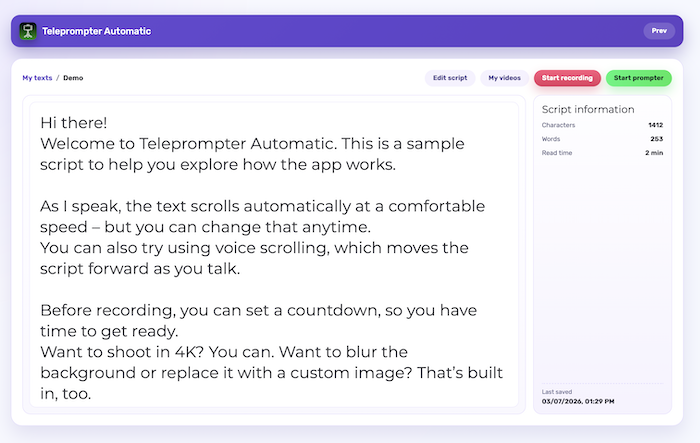
The script detail screen keeps the text readable while making the next step explicit: edit the words, review recordings, start a webcam recording, or open the prompter.
Use a full keyboard and larger canvas for lessons, presentations, launch videos, and structured updates.
Read and record from a supported webcam when the computer is already the center of the setup.
Control a mounted mobile reader from another device without touching the recording phone.
Organize scripts, selected cloud media, devices, and account settings from one dashboard.
One connected product
Web is strongest for typing, organization, browser reading, webcam capture, and management. Mobile apps add phone-camera workflows, audio-only capture, live options, and supported mobile editing.
Use a current desktop browser with the camera, microphone, local storage, IndexedDB, MediaRecorder, and fullscreen capabilities needed by your workflow. Recording and export support can differ by browser.
Allow access for the dashboard domain, check the browser site settings, and confirm the operating system also permits the browser to use the camera and microphone. Close other apps that may already be using the device.
No. Web is strongest for scripts, organization, browser reading, webcam recording, cloud management, and Web Remote. Mobile apps provide the phone-camera and supported mobile finishing workflows.
Prepare from a keyboard, rehearse in the browser, and continue on the device that fits the take.