
A training video script generator should help you organize a lesson, not decide what is true or what learners need to know. Start with one observable learning outcome, the learner's starting point, an approved source, one useful example, and a final action or check. Generate a starter draft, verify every teaching point, reshape it for spoken delivery, rehearse it in a teleprompter, and record the visuals that make the lesson understandable.
This guide focuses on the lesson-brief-to-script workflow. If the words are already approved and you mainly need help with camera position, pacing, and delivery, use the separate teleprompter guide for teachers and online lessons.
Quick workflow from learning outcome to recorded lesson
- Name one thing the learner should understand or be able to do after the video.
- Define who the learner is, what they already know, and what is outside this lesson.
- Collect the approved facts, steps, terms, examples, and cautions the script must preserve.
- Write a focused brief and use the AI video script generator in Educational script mode.
- Check the generated draft against the source before improving its style.
- Organize the lesson into an opening, teaching beats, an example or demonstration, a learner action, and a recap.
- Edit every line for speech, then rehearse it with the planned visuals and pauses.
- Record a short test, review it as a learner, and fix the script before the full take.
The generator can solve the blank page and propose a short spoken sequence. The instructor remains responsible for accuracy, scope, terminology, examples, permissions, and whether the finished lesson actually supports the learning outcome.
Define one observable outcome before writing the prompt
A topic is not yet a lesson outcome. Water cycle, new employee orientation, or camera basics describes a subject, but it does not say what the viewer should gain. A useful outcome completes this sentence: After this video, the learner can...
- identify the four stages shown in a water-cycle diagram
- complete one approved setup step in the correct order
- distinguish two terms that beginners often confuse
- demonstrate a technique while naming the reason for each movement
- choose the appropriate next step from a small set of realistic situations
Keep the verb observable. Words such as know or understand are difficult to test on their own. Identify, explain, compare, choose, and demonstrate give the script a clearer destination. If the outcome contains several verbs joined by and, the lesson may need to be divided into shorter videos.
Build a brief around the learner and the source
A generator cannot infer your curriculum, internal procedure, learner experience, or required terminology from a broad topic. Give it enough boundaries to draft one useful lesson without asking it to invent missing facts.
- Learner: who is watching, and how familiar are they with the subject?
- Outcome: what should they be able to explain, choose, or do?
- Starting point: what can the lesson safely assume they already know?
- Approved source: which facts, steps, definitions, or examples must the draft preserve?
- Scope: what belongs in this video, and what should wait for another lesson?
- Example: what concrete case, comparison, or demonstration makes the idea visible?
- Learner action: what should the viewer observe, answer, practice, or try next?
- Format: target duration, camera orientation, and any visual sequence the narration must follow.
A hypothetical brief could read: Create a 60-second beginner lesson that explains evaporation, condensation, precipitation, and collection. Use one safe glass-and-plate observation as the example, keep each stage to one short teaching beat, avoid unrelated weather systems, and end by asking the learner to identify where condensation appeared. The exact facts should come from the source you have already checked.
Do not load one prompt with an entire course. A generator asked to cover background, theory, demonstration, exceptions, assessment, and next steps in a minute will either rush or omit something important. Choose the smallest complete lesson that deserves its own recording.
Generate the starter draft in Educational script mode
The current Teleprompter Automatic web generator offers an Educational script mode described for lessons and explainers. You can identify the writing problem, enter the video idea, generate a short spoken draft, edit the result, and review its word count and reading-time estimate before moving into the reader.
Choose the blocker that matches the real problem. Use the blank-page option when you have a verified topic but no opening. Use the structure option when the facts exist but the teaching order is unclear. Use the spoken-language option when a written lesson plan sounds formal or dense on camera.
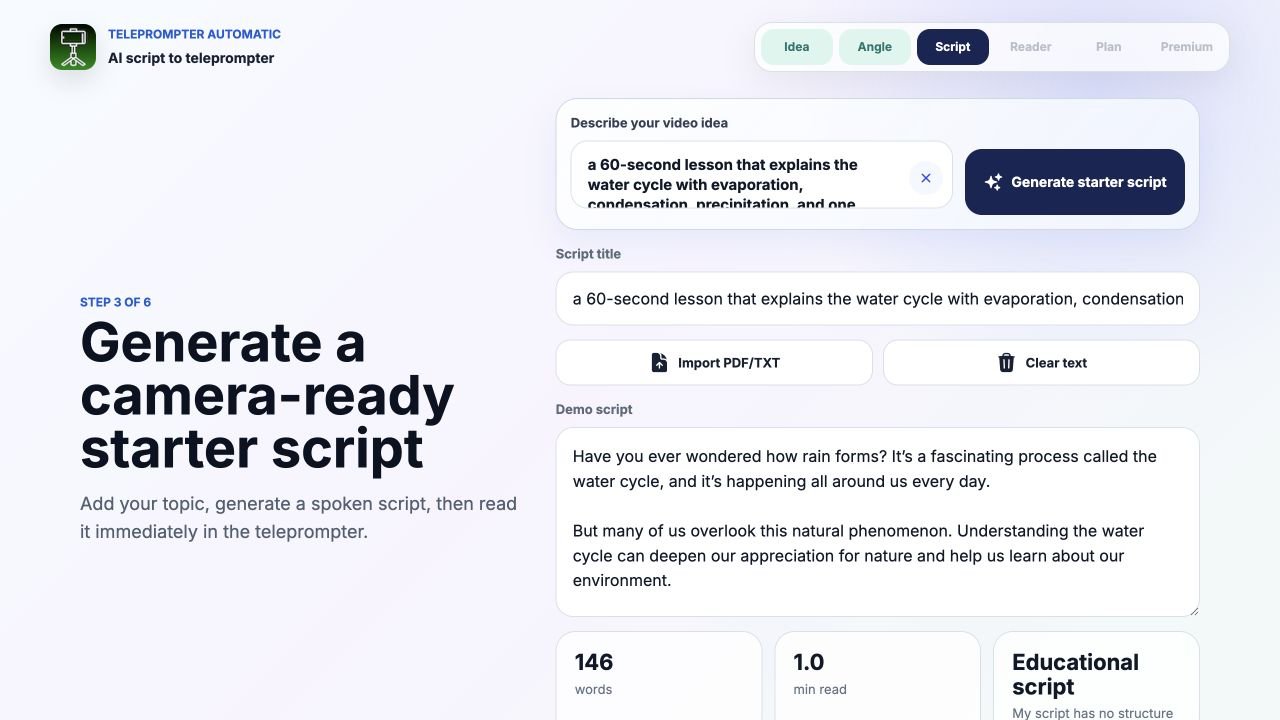
Treat the result as material for an instructional edit. A fluent sentence can still be irrelevant, too broad, out of order, or unsupported by your source. Generate again when the angle is fundamentally wrong. When the core sequence is useful, edit it deliberately instead of repeatedly requesting new wording.
Check instructional accuracy before polishing the language
Style edits can make an error harder to notice because the sentence begins to sound authoritative. Review the raw draft against the approved source first. Mark every definition, number, cause-and-effect statement, sequence, warning, product instruction, and promised result.
- Can each teaching point be traced to the current source?
- Are steps in the same order as the real task?
- Does the example follow the rule rather than contradict it?
- Are conditions and exceptions included when they change the learner's action?
- Are unfamiliar terms defined before the script uses them?
- Has the generator added a confident claim that the source does not support?
For workplace, safety, legal, medical, policy, or compliance training, use the current approved material and the responsible subject owner as the source of truth. If a statement cannot be verified, remove it, narrow it, or pause publication until the lesson can be made accurate. Stronger wording is not a substitute for evidence.
Turn the draft into a teachable sequence
A clear lesson is not simply a list of correct sentences. Each part should prepare the learner for the next part. Use this sequence as an editorial test, not as a rigid formula:
- Outcome: tell the learner what they will be able to identify, explain, choose, or do.
- Context: show when the idea or skill matters.
- Core teaching point: explain the smallest useful rule, concept, or sequence.
- Example or demonstration: make the abstract point visible in one concrete case.
- Learner action: ask the viewer to notice, answer, compare, or practice something specific.
- Recap: restate the decision, sequence, or idea they should retain.
- Next step: point to practice or the next lesson only when it follows naturally.
If the draft introduces a term after using it, move the definition earlier. If the example requires a fact that has not been taught, add the missing bridge or choose a simpler example. If the recap introduces new information, move that information into the lesson or remove it.
Use one example that reveals the idea
An example should reduce abstraction, not open a second lesson. Choose a case close enough to the learner's experience that the connection is quick. Explain exactly which part of the example demonstrates the teaching point.
For a concept lesson, show the rule and then one instance. For a procedure, show the action and the visible result. For a comparison, keep everything except the relevant difference stable. For a decision lesson, present a realistic situation, name the clue that matters, and explain why one choice fits.
Avoid stacking several examples that all prove the same thing. If the first example works, use the saved time for a learner check or a clearer recap. If the first example fails, replace it instead of adding more explanation around it.
Plan spoken lines and visual proof together
Training videos often need the viewer to watch an action, diagram, screen, object, or change while listening to the explanation. Build a simple beat sheet before the final script:
- Spoken point: the sentence the learner needs to hear.
- Visible evidence: the exact action, label, state, comparison, or result on screen.
- Pause: the time needed to inspect the visual before the next idea.
- Transition: the phrase or shot change that connects the next beat.
Keep production notes on separate lines, such as SHOW DIAGRAM, POINT TO STEP TWO, or PAUSE FOR OBSERVATION. These are writing cues for the presenter and editor, not automatic Teleprompter Automatic commands. Use one consistent cue style and remove any note that makes the reader harder to follow.
If the video demonstrates software or a physical process, the promise-action-result video structure can help separate narration from the action and visible result without turning the lesson into a product pitch.
Edit every line for spoken teaching
Read the generated draft aloud at the volume and pace you will use on camera. Mark every place where you lose the subject, run out of breath, scan across a long line, or sound unlike the instructor learners expect.
- Keep one main teaching idea in each sentence.
- Put the important noun or action early in the line.
- Replace document-style transitions with natural spoken connections.
- Use short paragraphs so each screenful represents one thought.
- Write names, numbers, formulas, and unfamiliar terms with extra visual space.
- Repeat a key term when a pronoun could make the reference unclear.
- Pause before the important distinction rather than adding more adjectives.
- Remove side notes that do not support the stated outcome.
After the copy is accurate, the guide to creating and importing teleprompter scripts covers practical preparation before rehearsal.
Fit the lesson to attention, not only reading time
A reading-time estimate measures spoken words. It does not include the time a learner needs to inspect a diagram, follow a cursor, copy a step, answer a question, or watch a physical demonstration. Rehearse the complete teaching sequence with those moments included.
If the lesson runs long, reduce scope before increasing speed. Remove a second example, move an exception to a follow-up lesson, shorten the introduction, or replace repeated explanations with one clear visual. Protect the outcome, the verified teaching point, the useful example, and the learner action.
Use the speech time calculator for an initial estimate, then time the actual run with pauses and visuals. A slower sentence can be the right choice when the learner must distinguish terms or observe a change.
Rehearse and record from the learner's point of view
Open the revised script in the reader and set a font size that is comfortable at the real camera distance. Adjust the pace with the teleprompter scrolling and reader controls, then rehearse the opening, the densest teaching beat, the visual transition, and the recap.
- Watch once for eye line and reader pace.
- Listen once for clear terms, sentence endings, and intentional pauses.
- Check that every visual appears when the narration names it.
- Confirm that labels, objects, gestures, and screen details remain legible.
- Pause long enough for the learner action or observation.
- Verify that the recap matches the outcome stated at the beginning.
Use the camera and recording settings guide for the setup test. When the script and visuals work together, follow the recording and export workflow for the finished take.
Use this training video brief and revision template
Copy this structure into your planning notes before opening the generator:
- Learner: This lesson is for...
- Starting point: They already know...
- Observable outcome: After the video, they can...
- Approved source: The facts or steps come from...
- Core teaching point: The one idea or sequence is...
- Important term: Define this before using it...
- Example or demonstration: Make the idea visible by...
- Learner action: Ask them to observe, answer, compare, or practice...
- Condition or exception: Include this only if it changes the action...
- Recap: The sentence they should retain is...
- Scope boundary: Do not cover...
- Target format: Duration, orientation, visuals, and next lesson...
After generation, label every sentence as outcome, context, teaching point, example, learner action, recap, transition, or unnecessary. If a sentence has no instructional job, revise or remove it. If an essential job is missing, add it from the approved source rather than asking the draft to conceal the gap.
Review the lesson in three passes
First, review accuracy without thinking about performance. Check every definition, sequence, condition, example, and result against the source. Confirm that the lesson stays inside its stated boundary.
Second, review instruction without the camera. Can the intended learner follow the order, connect the example to the idea, complete the action, and restate the recap? Remove knowledge the script assumes but never establishes.
Third, review sound and picture together. Check whether the visual arrives at the right line, the pace leaves time to inspect it, important terms are pronounced consistently, and the recap is understandable without replaying the entire video.
Common training video generator mistakes
- using a broad topic instead of one observable learning outcome
- asking the generator to invent facts, procedures, cautions, or policy
- covering several lessons in one short script
- polishing the wording before verifying the teaching points
- using terminology before defining it
- adding examples that introduce more complexity than they resolve
- describing a visual that never appears on screen
- treating production cues as words the presenter should say
- timing only the narration and forgetting observation or practice pauses
- speaking faster instead of reducing the lesson scope
- ending with a recap that introduces a new concept
- publishing the first generated draft without an instructional review
Continue the lesson script and recording workflow
- AI video script generator - Create a spoken starter draft and move it into teleprompter rehearsal.
- online teleprompter - Rehearse the verified lesson in a browser.
- teleprompter for teachers - Focus on lesson recording setup, delivery, and export.
- video teleprompter for recording - Connect the script with the camera workflow.
- teleprompter for content creators - Place lesson videos inside a broader repeatable recording workflow.