
A sales video script generator is most useful when it gives you a clear first draft to challenge, not a finished pitch to read without checking. Start with a brief that names the buyer, problem, change, proof, offer, and next action. Then generate the draft, verify every claim, rewrite it for spoken delivery, rehearse it in a teleprompter, and record the proof the script promises.
This guide focuses on that brief-to-script workflow. If you already have approved copy and mainly need help with the camera, pacing, and performance, use the separate sales video recording guide.
Quick workflow from sales brief to recorded video
- Choose one audience and one problem the video will address.
- Define the practical change your product or service can support.
- List the proof you can honestly show or state on camera.
- Describe the offer and the single action viewers should take next.
- Use the AI video script generator to create a spoken starter draft in Sales pitch mode.
- Fact-check the draft, remove unsupported language, and rewrite each line for speech.
- Rehearse the revised script at the real camera distance, then record and review the complete take.
The generator handles the blank page and gives the message a beginning, middle, and close. You remain responsible for the offer, evidence, limitations, pronunciation, and final promise.
Write a brief the generator can act on
A broad prompt such as make a sales video about my app leaves too many decisions open. The resulting script may sound polished while missing the exact buyer, situation, proof, or next step. A useful brief gives the generator enough boundaries to produce a draft you can evaluate.
- Audience: who is watching and what situation are they in?
- Problem: what concrete friction do they already recognize?
- Change: what becomes easier, clearer, faster, or more manageable?
- Proof: what action, result, example, or demonstration can the video show?
- Offer: what product, service, trial, demo, consultation, or resource is available?
- Next action: what should the viewer do after the video?
A hypothetical brief could read: Create a 60-second sales video for a meal-planning app aimed at busy parents. Open with the weekday dinner scramble, show how a parent can organize five dinners before the week starts, avoid health or savings claims, and end by inviting the viewer to try the planning workflow. Replace every detail with facts your real product can support.
Keep the prompt focused on one video. If it asks for awareness, product education, a full demonstration, pricing, objections, and several calls to action at once, the generator has to compress competing jobs into the same short draft.
Generate the starter draft in Sales pitch mode
The current Teleprompter Automatic web generator lets you choose Sales pitch, identify the part of writing that is blocking you, enter the video idea, and generate a short spoken draft. The result appears with a title, word count, reading-time estimate, and the selected mode before you move into the reader.
Use the writing blocker honestly. Choose the blank-page option when the topic exists but the first line does not. Choose the structure option when you have facts but no sequence. Choose the spoken-language option when the draft reads like a document instead of something you would say to a person.
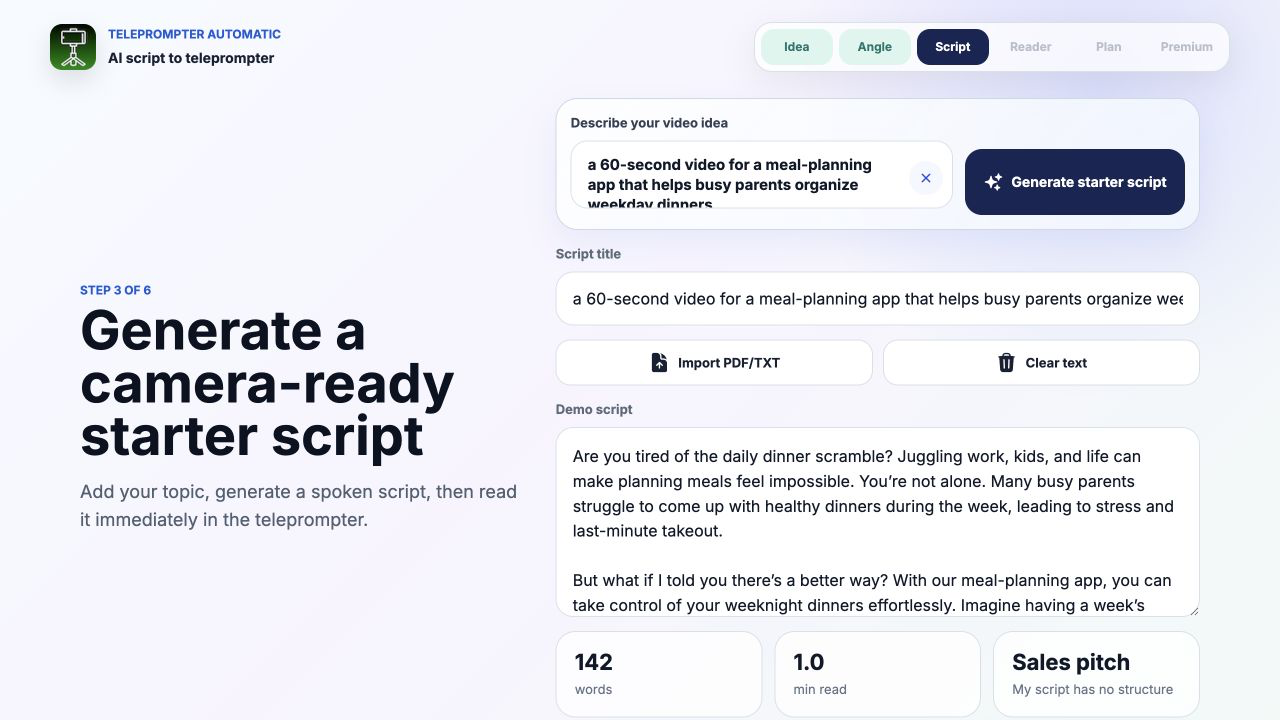
Read the first result as an editor. Do not keep a sentence merely because it sounds confident. Ask whether it is specific, supported, easy to say, and useful to the buyer. Generate again only when the angle is wrong; when the structure is close, a deliberate edit is usually more productive than repeatedly asking for a different draft.
Give each sales line one job
A short pitch becomes easier to assess when each section has one job. The exact wording can change, but this sequence gives the generated draft a practical test:
- Hook: name the situation or tension the right viewer recognizes.
- Problem: make the cost of that friction concrete without exaggerating it.
- Shift: introduce a more useful way to approach the task.
- Proof: show the product action, example, result, or condition that supports the shift.
- Offer: explain what the viewer can try, inspect, or request.
- Call to action: give one clear next step that matches the offer.
The hook should not promise more than the proof can carry. The product should not appear before the viewer understands why it matters. The call to action should not introduce a second offer at the end. If one paragraph performs several jobs, split it and decide which line deserves to stay.
Add proof before adding polish
Generated sales language often becomes vague at the point where evidence should begin. Words such as simple, powerful, effortless, or transformative do not show what happened. Replace them with something the viewer can inspect.
- Demonstrate one product action and its visible result.
- Show a real before-and-after state when the comparison is fair and repeatable.
- Use an approved customer statement only when you have permission and the context is accurate.
- Name a limitation or condition when it changes who should expect the result.
- Use exact numbers only when the source, unit, time period, and calculation are current.
For a demonstration-led pitch, the product demo video workflow explains how to separate a spoken promise from the action and visible result. A sales script can persuade, but the recording still has to show why the claim is credible.
Turn the generated draft into spoken language
A camera-ready script should be comfortable to say at normal volume while you look toward the lens. Read the generated draft aloud once before editing. Mark every place where you take an unplanned breath, lose the subject of the sentence, stumble over a phrase, or sound unlike yourself.
- Use one main idea per sentence.
- Replace formal transitions with words you use in conversation.
- Move the important noun or action toward the beginning of the line.
- Break long lists into separate beats or remove the least useful item.
- Write names, numbers, URLs, and unfamiliar terms on lines with extra visual space.
- Replace a generic adjective with a visible action or specific example.
- Keep the call to action short enough to repeat accurately.
Do not force every generated sentence to survive. The value of the draft is the structure and starting material, not the percentage of words you preserve. The guide to creating and importing scripts covers the next preparation step after the copy is approved.
Mark the teleprompter script for delivery
Once the sales copy is accurate, add a small number of performance cues. Put each cue on its own line so it cannot be mistaken for spoken copy. For example, use PAUSE before the main proof, SHOW PRODUCT before a demonstration, or LOOK TO LENS before the final action.
These labels are writing conventions, not automatic Teleprompter Automatic commands. Keep them consistent, rehearse which lines stay silent, and remove any cue that makes the screen busier without helping the take. Blank lines between hook, proof, offer, and close can be more useful than a page full of stage directions.
Use emphasis sparingly. If every line is capitalized, highlighted, or separated, nothing feels important. The teleprompter reader controls can adjust pace and readability; the script itself should still make the delivery pattern obvious.
Fit the script to the target duration
A generated reading-time estimate is a useful first signal, but a sales video also contains pauses, product movement, screen changes, and time for the viewer to understand the offer. Measure the revised script aloud with those moments included.
If the take runs long, protect the proof and remove repetition first. Do not solve every timing problem by speaking faster. Cut a second example, merge two descriptions of the same problem, or shorten the setup before removing the condition that makes a claim accurate.
The speech time calculator can estimate the spoken portion at different paces. Then use the real teleprompter rehearsal to account for your delivery, the product demonstration, and the final on-screen action.
Record the sales video around the evidence
Set the teleprompter close enough to the lens that your eye line stays natural at the chosen framing. Make the text large enough to read without scanning across long lines. Record a short test that includes the hook, one proof beat, and the call to action before attempting the full video.
- Watch once for eye line and reader pace.
- Listen once for speech clarity, room noise, and emphasis.
- Check once that the visual proof appears when the script refers to it.
- Confirm that product labels, screens, or physical actions remain legible.
- Verify that the final action matches the approved destination and offer.
Use the camera and recording settings guide for the setup test, then follow the recording and export workflow when the script and evidence are ready. Record focused pickups from a natural bridge when one section fails instead of automatically restarting every correct line.
Use this brief and revision template
Copy this structure into your planning notes before opening the generator:
- Viewer: The person watching is...
- Recognizable problem: They are trying to...
- Useful shift: A clearer way to approach it is...
- Product role: The product helps by...
- Proof available on camera: I can honestly show or state...
- Important condition: The viewer should know...
- Offer: The next thing available is...
- Single action: After watching, the viewer should...
- Target duration and format: The video should fit...
After generation, label every sentence as hook, problem, shift, proof, offer, call to action, or unnecessary. A sentence without a clear job is a candidate for revision or removal. A proof section without visible or verifiable support is a blocker, not a place to add stronger adjectives.
Review the result in three passes
First, review the message without the video. Does the script address one viewer, explain one problem, show one credible change, and end with one action? Remove any side topic that requires its own explanation.
Second, review the video without sound. Can the viewer see the relevant product, action, screen, comparison, or result? If the visual story does not support the words, change the shot plan or soften the claim.
Third, review sound and picture together. Check whether the proof arrives at the moment it is named, pauses feel intentional, the teleprompter pace leaves room for emphasis, and the final action is understandable without replaying the video.
Common sales video generator mistakes
- asking for a sales script without naming the viewer or situation
- letting the generator invent product facts, results, pricing, or guarantees
- keeping polished language that is difficult to say naturally
- introducing the product before the problem is clear
- using several offers or calls to action in one short video
- treating adjectives as a substitute for proof
- timing the script silently instead of rehearsing it aloud
- setting the scroll pace before product actions and pauses are planned
- recording the full take before testing hook, proof, and close
- publishing the first generated draft without a claim and accuracy check
Related Teleprompter Automatic guides
- AI video script generator - Create a starter draft and move it into teleprompter rehearsal.
- online teleprompter - Rehearse the approved script in a browser.
- video teleprompter for recording - Connect script reading with the camera workflow.
- 30-second video ad script - Compress one promise, proof point, and action into a shorter format.
- sales video teleprompter workflow - Focus on setup, delivery, and the finished recording.
- teleprompter for content creators - Place the sales video inside a broader scripted content workflow.