
A case study video needs more than an enthusiastic quote. Viewers should understand the starting problem, what changed, and which results the people involved can actually support. A teleprompter can keep the story organized, but reading a customer’s experience word for word may make it feel less like their own.
This guide focuses on that balance: prepare precise narration, give participants room to speak naturally, and check the finished story before sharing it. For the broader script-to-camera workflow, see the video teleprompter recording guide. If you need a single customer endorsement rather than a problem-to-result story, use the video testimonial guide.
Choose one change you can substantiate
Before writing, ask the customer or project team what happened before, what they did, and what is different now. Look for one narrow through-line rather than a list of benefits. A case study about a service team changing its appointment process, for example, could follow the old booking difficulty, the new process, and the customer’s experience using it.
- Starting point: What specific task or problem was difficult? Who experienced it?
- Action: What was introduced or changed? Show the step that matters rather than naming every feature.
- Result: What can the participant describe firsthand? Check any figures, dates, or comparisons with the person responsible for them.
- Limit: What should the video avoid implying? An improvement one customer experienced is not a promise that everyone will get the same result.
Make a small evidence sheet before filming: each proposed claim, its source, the person who can say it, and any visual that genuinely illustrates it. If a number cannot be checked, leave it out rather than turning an impression into a statistic.
Script the structure, not the customer’s feelings
Give the narrator or company representative a short, factual script for context and transitions. Give the customer topic prompts: “What was hard before?” and “What happened the first time you used the new process?” Their own answer is usually more useful than a line written on their behalf. Agree on sensitive wording and factual details in advance, but do not ask them to claim an outcome they would not volunteer.
Hypothetical script example — not a real customer account:
Host: “The team changed how appointment requests were handled. Here is what the process looked like for one customer.”
Customer prompt, not a line to read: “Walk us through how you requested an appointment before and after the change.”
Host: “Let’s look at the step the customer just described.”
Put only the host’s spoken lines and brief transition cues in the teleprompter script. Keep production notes such as “show booking screen” separate from the words to be read. Teleprompter Automatic lets you create and edit a script; the script preparation guide covers getting that text ready for the reader.
Decide who says each claim—and what viewers will see
A simple sequence is: host introduces the situation; customer describes the problem in their own words; host explains the relevant action; customer describes what changed; a closing line states the next step or remaining context. You do not need every speaker on camera for every point. Film the work, setting, or process that helps a viewer understand a statement, and avoid visuals that suggest a result the speaker has not established.
Hypothetical evidence-sheet example: Suppose a customer says they previously requested appointments by phone and now use a booking form. First, confirm that account with the customer and check the process change with the team. Assign the customer their own before-and-after account; assign the host only the confirmed explanation of what the team changed. A shot of the form with no personal information could illustrate the new step. It would not, by itself, establish that booking became faster. After editing, check that the shot accompanies the right statement and that the cut does not turn the customer’s experience into a claim about every customer.
For a customer interview, keep short prompts nearby instead of scrolling a full answer in front of them. Let them finish a thought, then ask a follow-up if a detail is missing. For the host, write one idea per short passage so a pause sounds intentional. Record the customer’s full answer before trying to shorten it; do not stitch separate answers together in a way that changes their meaning.
Set the reader for a conversational take
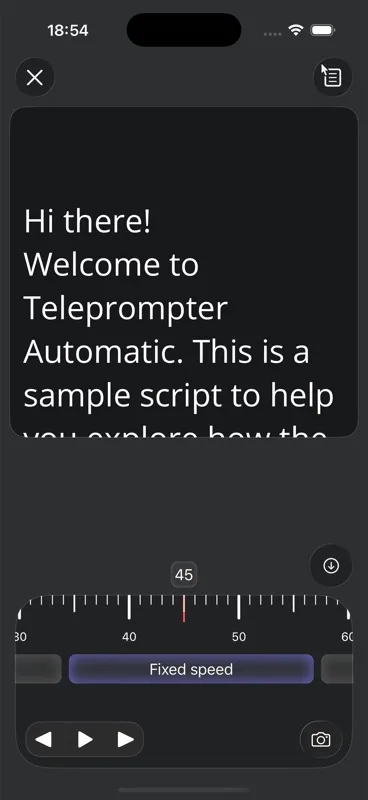
Open the host script and read it aloud before choosing a scroll pace. Teleprompter Automatic offers fixed-speed, timed, and words-per-minute scrolling; its Voice Scroll follows speech on supported mobile devices. For a reflective host passage, start with a pace that allows pauses instead of forcing every sentence into a fixed duration. The reader controls guide explains the scrolling choices.
Place the text close enough to the camera lens that the host can return their gaze to the viewer between phrases. Choose the front camera when the speaker needs to check their own framing; the camera and recording settings guide recommends a short test to check sharpness, audible sound, whether text covers the face, and scroll comfort. Choose and test the intended microphone before the real take. If the speaker needs a moment to settle, the recording countdown can provide a delay before capture begins.
Record short story blocks, not one perfect performance
Film the introduction, problem, action, and closing as separate speaking blocks if that helps the host stay conversational. Before each block, ask the speaker to explain its point without reading. Then record the prepared line and allow natural pauses; restart a block when its meaning changes, not merely because a harmless word differs from the script.
- Open the prepared script in reading or recording mode and confirm that camera and microphone access work.
- Make a brief test recording. Play it back for voice clarity, eye line, text placement, and whether the speaker sounds like themselves.
- Start the real take with Start recording or Record. If a countdown appears, wait for it before speaking.
- Stop at the end of the block. Note which take contains the clearest accurate statement so you can find it during review.
Teleprompter Automatic’s record-and-export guide covers the recording controls and reviewing a saved take. Customer answers can be filmed as an interview without treating the teleprompter script as a required line-by-line answer.
Review for accuracy before choosing the final take
Watch the video once for the story and again for individual claims. Can a viewer tell what happened first, what the team did, and what the customer personally observed? Compare the finished video with the evidence sheet: check each speaker’s claim against its source, then check whether the accompanying shot illustrates only that claim. In the hypothetical appointment example, a booking-form shot can show the new step, but should not be used to imply an unverified improvement in speed. Check names, figures, dates, on-screen material, and whether a cut makes a speaker appear to endorse a broader conclusion. Ask the relevant participant to confirm any quotation or result attributed to them before the video is shared.
Keep the version that is both clear and faithful, even if another take is smoother. Review the saved recording before exporting. Where the browser or platform supports it, Teleprompter Automatic offers Export MP4; its recording guide also describes uploading a selected recording when you want a cloud copy. The format and destination come after the editorial check—not before it.
Case study video questions
Should the customer read from the teleprompter?
Usually, give the customer topic prompts and let them describe their own experience. Use scripted lines for context or wording that must be exact, and confirm that the customer agrees with any statement attributed to them.
What if we do not have a measurable result?
Focus on a specific change the participant can describe firsthand. Do not turn a personal impression into a statistic or imply that the same outcome is guaranteed for other customers.
How do I keep the host from sounding scripted?
Write short spoken passages, rehearse each point without reading, set a comfortable scroll pace, and review a brief test take. Keep a natural pause when it helps the meaning.
How is this different from a testimonial video?
A testimonial may center on a customer’s endorsement. A case study also explains the starting situation, the action taken, and a result or change that can be supported.