If Teleprompter Automatic says there are too many active devices, your account has reached the active-session limit for mobile devices. The dashboard copy confirms that active sessions from mobile devices must not exceed 5.
Why this happens
- You signed in on several phones or tablets.
- You changed devices and old sessions stayed active.
- You use mobile apps together with Web.
- Your login may have been shared or used on a device you no longer trust.
Remove old devices
- Open dashboard.teleprompter.pw and sign in.
- Open My devices.
- Review platform, sign-in method, device name, model, and last activity.
- Delete sessions you no longer use.
- Return to the app and sign in again.
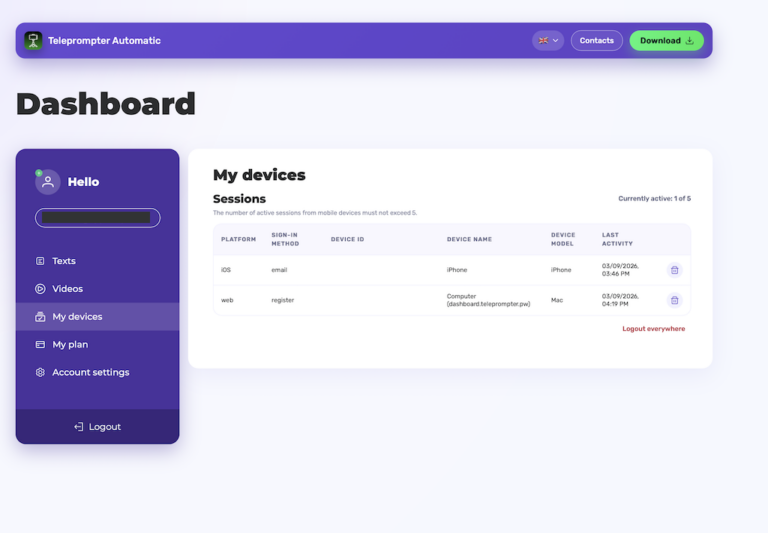
Use logout everywhere when needed
If you think another person has access to your account, use Logout everywhere from the dashboard, then sign in again only on trusted devices.
Expected result
After removing old sessions, the active count should drop below the limit and the new device should be able to sign in.
If this does not solve the issue, contact support from the Teleprompter Automatic Help Center. If you also changed phones, check restore purchases.
Which sessions should you delete?
Delete devices you no longer recognize, devices you sold or replaced, and old app installs that have not been used recently. Keep the current phone, tablet, and browser session that you actively use.
Prevent the limit from returning
Sign out before selling or resetting a device. Avoid sharing your login. If you test Teleprompter Automatic on several devices, clean up the My devices list after testing so future sign-ins are not blocked during a recording session.